Express, PostgreSQL & Prisma - Full Stack Development - Part II
Previous: Part I - Angular & Next.js · Next: Part III - Angular, Express & MongoDB (NoSQL variant)
In Part I you consumed a public API (dummyjson). In this part you build your own REST API with Node.js and Express, store the data in PostgreSQL through the Prisma ORM, then connect your Angular and Next.js applications to it.
Learning objectives
- explain what a REST API is (resources, HTTP verbs, status codes)
- structure an Express application in layers (routes, services, data access)
- model a database with Prisma, create and apply migrations, seed data
- validate incoming data (Zod), handle errors, log requests
- connect Angular and Next.js to the API (CORS, environment variables)
- run the whole stack (database, API, 2 front-ends) with Docker Compose
Prerequisites: Part I, Docker Desktop, basic SQL (tables, primary/foreign keys).
Versions used
Latest stable versions when this lab was written (check with npm view <package> version):
| Tool | Version |
|---|---|
| Node.js | 24 LTS |
| Express | 5 |
Prisma (prisma and @prisma/client) |
7.x |
| Zod | 4 |
| PostgreSQL | 17 (Docker image) |
Final layout
fullstack-tp/
├── ngapp/
├── nxapp/
├── api/                      # this part
└── docker-compose.yml
The toolbox
Short description of each tool used in this part. Each one is introduced again when we use it.
| Tool | What it is | Why we use it |
|---|---|---|
| Node.js | JavaScript runtime outside the browser | runs our server |
| Express | minimal HTTP framework: routes map a URL + verb to a function, middlewares are functions run before/after | build the REST API |
| TypeScript / tsx | typed JavaScript / a tool that runs .ts files directly with reload |
same language as the front-ends, fewer bugs; tsx watch for development |
| PostgreSQL | open-source relational database (tables, SQL) | store products durably |
| Docker Compose | describes several containers in one YAML file | start the database (and later everything) with one command |
| Prisma | ORM (Object-Relational Mapper): you describe tables in a schema file, Prisma generates the SQL migrations and a typed client (prisma.product.findMany() instead of writing SQL) |
productivity, type safety, readable code |
| Prisma Studio | web UI to browse and edit the database | inspect data while developing |
| Zod | schema validation library that also infers TypeScript types | reject invalid requests (400) with clear messages |
| Morgan | HTTP request logger | see GET /api/products 200 12 ms in the terminal |
| cors | middleware adding CORS headers | the browser blocks calls from localhost:4200 to localhost:4000 unless the API allows them |
| Helmet | middleware setting security-related HTTP headers | basic hardening |
| dotenv | loads .env into process.env |
keep configuration and secrets out of the code |
| JWT + argon2/bcrypt (bonus) | signed tokens for authentication / password hashing | login |
| Vitest + Supertest (bonus) | test runner / HTTP assertions | automated API tests |
| REST Client / Postman / curl | tools to send HTTP requests | test endpoints without a front-end |
Why Prisma? It is the most widely used ORM in the Node/TypeScript ecosystem, has excellent documentation, a declarative schema and a fully typed client, which suits learners. Alternatives worth knowing: Drizzle (closer to SQL, lightweight), TypeORM and Sequelize (older, decorator/class based).
1. REST concepts
A REST API exposes resources (here: products, categories) through URLs, and uses HTTP verbs for actions.
| Action | Verb + URL | Success code | Body |
|---|---|---|---|
| List | GET /api/products |
200 | array |
| Read one | GET /api/products/12 |
200 | object |
| Create | POST /api/products |
201 | created object |
| Replace / update | PUT or PATCH /api/products/12 |
200 | updated object |
| Delete | DELETE /api/products/12 |
204 | none |
Common error codes: 400 invalid data, 401 not authenticated, 403 forbidden, 404 not found, 409 conflict, 500 server error.
Data travels as JSON. Application layers:
HTTP request -> route (URL + verb) -> validation -> service (business logic) -> Prisma -> PostgreSQL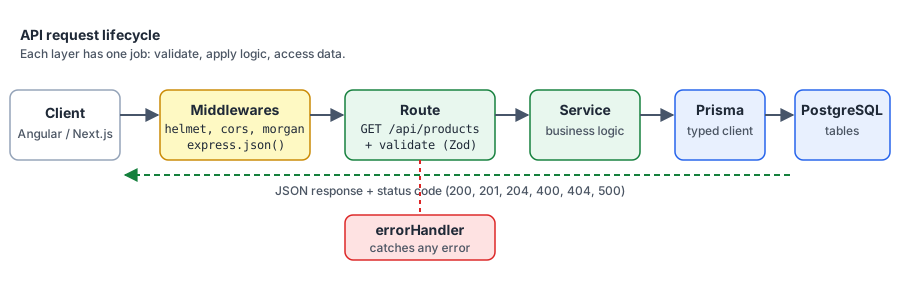
Figure 1 - The journey of a request through the API layers
2. Start PostgreSQL with Docker
At the root of fullstack-tp, create docker-compose.yml (the database only, for now):
services:
  db:
    image: postgres:17
    restart: unless-stopped
    environment:
      POSTGRES_USER: app
      POSTGRES_PASSWORD: app
      POSTGRES_DB: shop
    ports:
      - "5432:5432"
    volumes:
      - pgdata:/var/lib/postgresql/data   # data survives container removal
    healthcheck:
      test: ["CMD-SHELL", "pg_isready -U app -d shop"]
      interval: 5s
      timeout: 3s
      retries: 10

volumes:
  pgdata:
docker compose up -d db
docker compose ps
app/appcredentials are fine for development on your machine. Never use them in production.
3. Create the Express project
mkdir api
cd api
npm init -y
npm install express cors helmet morgan zod dotenv @prisma/client @prisma/adapter-pg pg
npm install -D typescript tsx prisma @types/node @types/express @types/cors @types/morgan @types/pg- In
package.jsonadd"type": "module"and the scripts:
{
  "type": "module",
  "scripts": {
    "dev": "tsx watch src/server.ts",
    "build": "tsc",
    "start": "node dist/server.js"
  }
}- Create
tsconfig.json:
{
  "compilerOptions": {
    "target": "ES2022",
    "module": "NodeNext",
    "moduleResolution": "NodeNext",
    "outDir": "dist",
    "rootDir": "src",
    "strict": true,
    "esModuleInterop": true,
    "skipLibCheck": true
  },
  "include": ["src"]
}
With
NodeNext, relative imports must end with.js(even for.tsfiles). This is a common source of errors:import x from "./x.js".
-
Create
.gitignorecontainingnode_modules,dist,.env,src/generated. -
First server,
src/app.ts:
import express from "express";
import cors from "cors";
import helmet from "helmet";
import morgan from "morgan";

export const app = express();

app.use(helmet());                                        // security headers
app.use(cors({ origin: ["http://localhost:4200", "http://localhost:3000"] })); // allowed front-ends
app.use(morgan("dev"));                                   // request log
app.use(express.json());                                  // parse JSON bodies

app.get("/api/health", (_req, res) => {
  res.json({ status: "ok" });
});src/server.ts:
import "dotenv/config";
import { app } from "./app.js";

const port = Number(process.env.PORT ?? 4000);
app.listen(port, () => console.log(`API listening on http://localhost:${port}`));
Run npm run dev and open http://localhost:4000/api/health.
Checkpoint: you get {"status":"ok"} and Morgan prints the request in the terminal.
4. Model the database with Prisma
Prisma reads a schema file, creates the tables (through migrations, versioned SQL files you commit to Git) and generates a typed client.
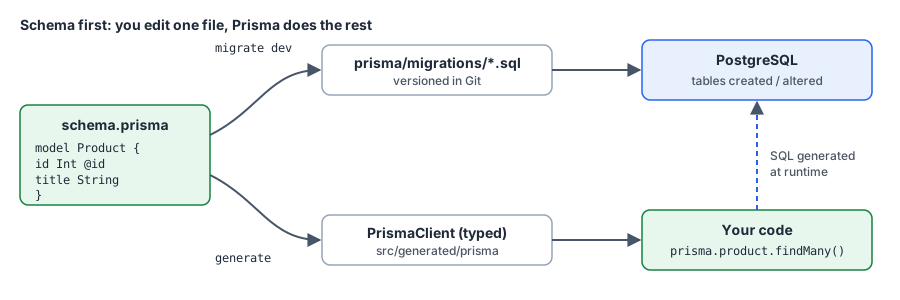
Figure 2 - The Prisma workflow
- Initialize (creates
prisma/schema.prisma,prisma.config.tsand a.env):
npx prisma init --datasource-provider postgresql --output ../src/generated/prisma- Set the connection string in
api/.env:
DATABASE_URL="postgresql://app:app@localhost:5432/shop?schema=public"
PORT=4000- Write the models in
prisma/schema.prisma(keep thegeneratoranddatasourceblocks generated for you):
model Category {
  id       Int       @id @default(autoincrement())
  name     String    @unique
  products Product[]
}

model Product {
  id          Int      @id @default(autoincrement())
  title       String
  description String
  price       Decimal  @db.Decimal(10, 2)
  thumbnail   String
  stock       Int      @default(0)
  createdAt   DateTime @default(now())
  updatedAt   DateTime @updatedAt

  category    Category @relation(fields: [categoryId], references: [id])
  categoryId  Int

  @@index([categoryId])
}
Category 1 — n Product: one category has many products, one product belongs to one category (categoryId is the foreign key).
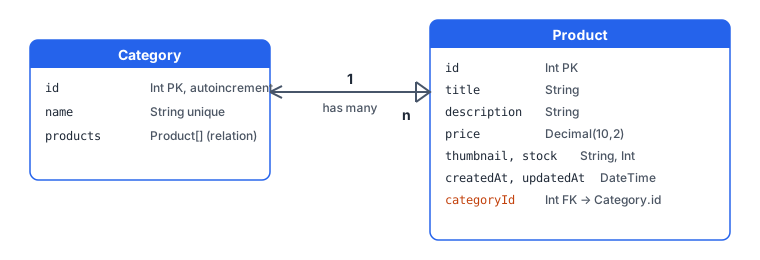
Figure 3 - The data model
- Create the tables. Prisma compares the schema with the database, writes the SQL in
prisma/migrations/and applies it:
npx prisma migrate dev --name init- Look at the result in the browser:
npx prisma studio- Create the client used by the app,
src/lib/prisma.ts. Prisma 7 connects through a driver adapter (herepg, the PostgreSQL driver):
import { PrismaPg } from "@prisma/adapter-pg";
import { PrismaClient } from "../generated/prisma/client.js";

const adapter = new PrismaPg({ connectionString: process.env.DATABASE_URL });
export const prisma = new PrismaClient({ adapter });
The generated client path depends on the
outputyou chose in thegeneratorblock. Adapt the import if yours differs.
Seed the database
A seed script fills the database with initial data. Import the dummyjson products. Create prisma/seed.ts:
import "dotenv/config";
import { PrismaPg } from "@prisma/adapter-pg";
import { PrismaClient } from "../src/generated/prisma/client.js";

const prisma = new PrismaClient({
  adapter: new PrismaPg({ connectionString: process.env.DATABASE_URL }),
});

type DummyProduct = {
  title: string; description: string; price: number;
  thumbnail: string; stock: number; category: string;
};

async function main() {
  const res = await fetch("https://dummyjson.com/products?limit=100");
  const { products } = (await res.json()) as { products: DummyProduct[] };

  await prisma.product.deleteMany();
  for (const p of products) {
    await prisma.product.create({
      data: {
        title: p.title,
        description: p.description,
        price: p.price,
        thumbnail: p.thumbnail,
        stock: p.stock,
        category: {
          connectOrCreate: { where: { name: p.category }, create: { name: p.category } },
        },
      },
    });
  }
  console.log(`Seeded ${products.length} products`);
}

main().finally(() => prisma.$disconnect());
Declare the seed command in prisma.config.ts (in the migrations section, next to path):
migrations: {
  path: "prisma/migrations",
  seed: "tsx prisma/seed.ts",
},
npx prisma db seedCheckpoint: Prisma Studio shows about 100 products and their categories.
5. The products API (CRUD)
Validation with Zod
Never trust the client. Zod describes what a valid request looks like; anything else is rejected with a 400. Create src/schemas/product.ts:
import { z } from "zod";

export const idParam = z.object({ id: z.coerce.number().int().positive() });

export const listQuery = z.object({
  limit: z.coerce.number().int().min(1).max(100).default(12),
  skip: z.coerce.number().int().min(0).default(0),
  q: z.string().trim().optional(),
  category: z.string().optional(),
});

export const productBody = z.object({
  title: z.string().min(2),
  description: z.string().min(1),
  price: z.number().positive(),
  thumbnail: z.url(),
  stock: z.number().int().min(0).default(0),
  category: z.string().min(1),          // category name, created if missing
});

export const productPatch = productBody.partial(); // every field optional for PATCH
z.coerce.number() converts the string "12" from the URL into the number 12.
Service (business logic and data access)
src/services/productService.ts:
import { prisma } from "../lib/prisma.js";
import type { z } from "zod";
import type { listQuery, productBody, productPatch } from "../schemas/product.js";

type ListQuery = z.infer<typeof listQuery>;
type ProductBody = z.infer<typeof productBody>;
type ProductPatch = z.infer<typeof productPatch>;

const withCategory = { category: true } as const;

export async function list({ limit, skip, q, category }: ListQuery) {
  const where = {
    ...(q && { title: { contains: q, mode: "insensitive" as const } }),
    ...(category && { category: { name: category } }),
  };
  const [products, total] = await Promise.all([
    prisma.product.findMany({ where, take: limit, skip, orderBy: { id: "asc" }, include: withCategory }),
    prisma.product.count({ where }),
  ]);
  return { products, total, limit, skip };
}

export const getById = (id: number) =>
  prisma.product.findUnique({ where: { id }, include: withCategory });

export const create = ({ category, ...data }: ProductBody) =>
  prisma.product.create({
    data: { ...data, category: { connectOrCreate: { where: { name: category }, create: { name: category } } } },
    include: withCategory,
  });

export const update = (id: number, { category, ...data }: ProductPatch) =>
  prisma.product.update({
    where: { id },
    data: {
      ...data,
      ...(category && {
        category: { connectOrCreate: { where: { name: category }, create: { name: category } } },
      }),
    },
    include: withCategory,
  });

export const remove = (id: number) => prisma.product.delete({ where: { id } });
Validation middleware
src/middlewares/validate.ts: a reusable middleware that validates body, params or query against a Zod schema.
import type { RequestHandler } from "express";
import type { ZodType } from "zod";

export const validate =
  (schema: ZodType, source: "body" | "params" | "query" = "body"): RequestHandler =>
  (req, res, next) => {
    const result = schema.safeParse(req[source]);
    if (!result.success) {
      return res.status(400).json({ error: "Validation failed", details: result.error.issues });
    }
    // Express 5: req.query is read-only, so keep the parsed values elsewhere
    res.locals[source] = result.data;
    next();
  };
Routes
src/routes/products.ts:
import { Router } from "express";
import { validate } from "../middlewares/validate.js";
import { idParam, listQuery, productBody, productPatch } from "../schemas/product.js";
import * as service from "../services/productService.js";

export const productsRouter = Router();

productsRouter.get("/", validate(listQuery, "query"), async (_req, res) => {
  res.json(await service.list(res.locals.query));
});

productsRouter.get("/:id", validate(idParam, "params"), async (_req, res) => {
  const product = await service.getById(res.locals.params.id);
  if (!product) return res.status(404).json({ error: "Product not found" });
  res.json(product);
});

productsRouter.post("/", validate(productBody), async (_req, res) => {
  res.status(201).json(await service.create(res.locals.body));
});

productsRouter.patch("/:id", validate(idParam, "params"), validate(productPatch), async (_req, res) => {
  res.json(await service.update(res.locals.params.id, res.locals.body));
});

productsRouter.delete("/:id", validate(idParam, "params"), async (_req, res) => {
  await service.remove(res.locals.params.id);
  res.status(204).end();
});
In Express 5, errors thrown in an
asynchandler are forwarded automatically to the error middleware (notry/catchneeded, unlike Express 4).
Central error handling
src/middlewares/errorHandler.ts:
import type { ErrorRequestHandler } from "express";
import { Prisma } from "../generated/prisma/client.js";

export const errorHandler: ErrorRequestHandler = (err, _req, res, _next) => {
  // Prisma: record to update/delete does not exist
  if (err instanceof Prisma.PrismaClientKnownRequestError && err.code === "P2025") {
    return res.status(404).json({ error: "Not found" });
  }
  console.error(err);
  res.status(500).json({ error: "Internal server error" });
};
Register everything at the end of src/app.ts (the error handler must come last):
import { productsRouter } from "./routes/products.js";
import { errorHandler } from "./middlewares/errorHandler.js";

app.use("/api/products", productsRouter);
app.use(errorHandler);
6. Test the API
Install the REST Client extension for VS Code and create api/requests.http:
@base = http://localhost:4000/api

### list with pagination, search and filter
GET {{base}}/products?limit=5&skip=0
###
GET {{base}}/products?q=phone&category=smartphones

### one product
GET {{base}}/products/1

### create
POST {{base}}/products
Content-Type: application/json

{
  "title": "My product",
  "description": "Created from the lab",
  "price": 19.99,
  "thumbnail": "https://cdn.dummyjson.com/product-images/1/thumbnail.webp",
  "stock": 10,
  "category": "lab"
}

### invalid body -> 400
POST {{base}}/products
Content-Type: application/json

{ "title": "x", "price": -5 }

### update
PATCH {{base}}/products/1
Content-Type: application/json

{ "price": 9.5 }

### delete
DELETE {{base}}/products/101

### not found -> 404
GET {{base}}/products/99999Checkpoint: check the status code of each request (200, 201, 400, 200, 204, 404) against the REST table of section 1.
Exercise 8: add a GET /api/categories endpoint that returns the categories with their number of products (_count in Prisma).
7. Connect the front-ends
Angular
- Set the API URL in
src/environments/environment.ts(ng generate environmentsif the folder does not exist):apiUrl: 'http://localhost:4000/api'. - Extend the
ProductServicefrom Part I:
import { environment } from '../environments/environment';

export interface ProductPage {
  products: Product[];
  total: number;
  limit: number;
  skip: number;
}

getProducts(limit = 12, skip = 0) {
  return this.http.get<ProductPage>(`${environment.apiUrl}/products`, { params: { limit, skip } });
}

createProduct(product: Omit<Product, 'id'>) {
  return this.http.post<Product>(`${environment.apiUrl}/products`, product);
}
Your API returns thumbnail, title, price like dummyjson, plus category as an object ({ id, name }): update the Product interface.
- Note: the browser calls the API from another origin (
4200→4000). That is why the API configures CORS (section 3). Try removing thecorsline and read the browser error in the console.
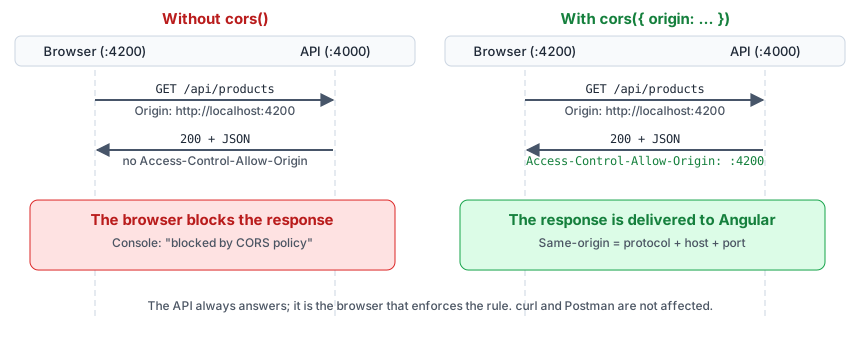
Figure 5 - Why the browser needs CORS headers
Next.js
.env.local:API_URL=http://localhost:4000/api(noNEXT_PUBLIC_prefix: only the server reads it).- In a Server Component:
const res = await fetch(`${process.env.API_URL}/products?limit=12&skip=0`, { cache: "no-store" });
const { products, total } = await res.json();
cache: "no-store" disables the Next.js cache so you always see fresh data.
- Create a product from a client-side form (reuse the form of Part I):
fetch("http://localhost:4000/api/products", { method: "POST", headers: { "Content-Type": "application/json" }, body: JSON.stringify(data) }). Since this call runs in the browser, it needs the public URL: useNEXT_PUBLIC_API_URL.
Checkpoint: your catalogue from Part I now displays the data of your database; a product created from the form appears in the list and in Prisma Studio.
8. Authentication (JWT)
Outline (documentation and implementation are up to you):
- Add a
Usermodel (emailunique,passwordHash), run a migration. POST /api/auth/register: validate with Zod, hash the password with argon2 (or bcrypt), never store it in clear.POST /api/auth/login: verify the password, return a JWT (jsonwebtoken) signed with a secret from.env.- Middleware
requireAuth: readAuthorization: Bearer <token>, verify it, else401. - Protect
POST/PATCH/DELETE /api/products. - In Angular, an HTTP interceptor adds the header; connect it to the
loginpage from Part I.
9. Dockerize the whole stack
API Dockerfile (api/Dockerfile)
# ---- build ----
FROM node:24-alpine AS build
WORKDIR /app
COPY package*.json ./
RUN npm ci
COPY . .
RUN npx prisma generate && npm run build

# ---- run ----
FROM node:24-alpine
WORKDIR /app
ENV NODE_ENV=production
COPY package*.json ./
RUN npm ci --omit=dev
COPY --from=build /app/dist ./dist
COPY --from=build /app/src/generated ./dist/generated
COPY prisma ./prisma
COPY prisma.config.ts ./
EXPOSE 4000
CMD ["node", "dist/server.js"]
prismais a dev dependency, but we need it at startup to apply migrations. Either moveprismatodependencies, or apply migrations from a separate one-shot service. Add a.dockerignore(node_modules,dist,.env). The generated client is insrc/generated; sincetsccompilessrctodist, check where it ends up in your version and adapt theCOPYline (or the import path) accordingly.
docker-compose.yml (complete)
services:
  db:
    image: postgres:17
    environment:
      POSTGRES_USER: app
      POSTGRES_PASSWORD: app
      POSTGRES_DB: shop
    volumes:
      - pgdata:/var/lib/postgresql/data
    healthcheck:
      test: ["CMD-SHELL", "pg_isready -U app -d shop"]
      interval: 5s
      timeout: 3s
      retries: 10

  api:
    build: ./api
    environment:
      DATABASE_URL: postgresql://app:app@db:5432/shop?schema=public   # host is the service name "db"
      PORT: 4000
    depends_on:
      db:
        condition: service_healthy
    command: sh -c "npx prisma migrate deploy && node dist/server.js"
    ports:
      - "4000:4000"

  ngapp:
    build: ./ngapp        # Dockerfile from Part I
    ports:
      - "4200:80"
    depends_on: [api]

  nxapp:
    build: ./nxapp        # Dockerfile from Part I
    environment:
      API_URL: http://api:4000/api   # server-side calls use the Docker network
    ports:
      - "3000:3000"
    depends_on: [api]

volumes:
  pgdata:
docker compose up --build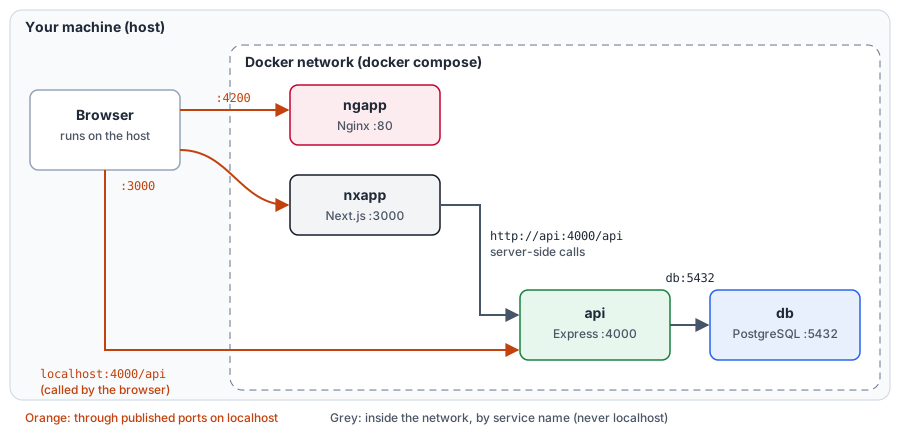
Figure 4 - Who talks to whom: host ports vs the Docker network
Points to understand:
- Containers reach each other by service name (
db,api), notlocalhost. - The browser, however, runs on your machine: it must call
http://localhost:4000/api. Server-side calls (Next.js Server Components) usehttp://api:4000/api. prisma migrate deployapplies existing migrations (used in production), unlikemigrate dev(development only, can create migrations).- The
pgdatavolume keeps the data between restarts;docker compose down -vdeletes it.
Challenge Activity – Full Stack Product Catalogue
Deliver a complete application:
- API: full CRUD on products,
GET /api/categories, pagination, search (q) and category filter, Zod validation, central error handling,requests.httpfile. - Database: Prisma schema (at least
ProductandCategory, plus one extra model of your choice, e.g.RevieworUser), committed migrations, seed script. - Angular + Bootstrap and Next.js + Tailwind front-ends reading from your API: list, detail, pagination, search, category filter, and an admin form to create/edit/delete a product.
- Docker:
docker compose up --buildstarts everything from a clean clone. Images pushed to Docker Hub. - README: prerequisites, how to run (with and without Docker), environment variables, API endpoints table.
Bonus: JWT authentication protecting the write endpoints, automated tests (Vitest + Supertest), OpenAPI/Swagger documentation.
Deliverables
- Git repository (
api/,ngapp/,nxapp/,docker-compose.yml,README.md), with.env.examplefiles (never commit real.env) - Docker Hub image names
- the
requests.http(or Postman) collection
Common errors
| Symptom | Likely cause |
|---|---|
ERR_MODULE_NOT_FOUND on a relative import |
missing .js extension in the import path (NodeNext) |
P1001: Can't reach database server |
container not started, wrong host (localhost vs db), wrong port |
| CORS error in the browser console | front-end origin missing from the cors configuration |
Cannot find module '../generated/prisma/client.js' |
forgot npx prisma generate (or migrate dev), or wrong output path |
req.query cannot be assigned (Express 5) |
keep the parsed values in res.locals as in validate.ts |
Data lost after docker compose down -v |
-v deletes the volume, use plain down |