Lab 01 — Port Scanner
Introduction
TCP and the Three-Way Handshake
TCP (Transmission Control Protocol) is connection-oriented. Before any data is exchanged, two hosts must agree to talk. This agreement is called the three-way handshake:
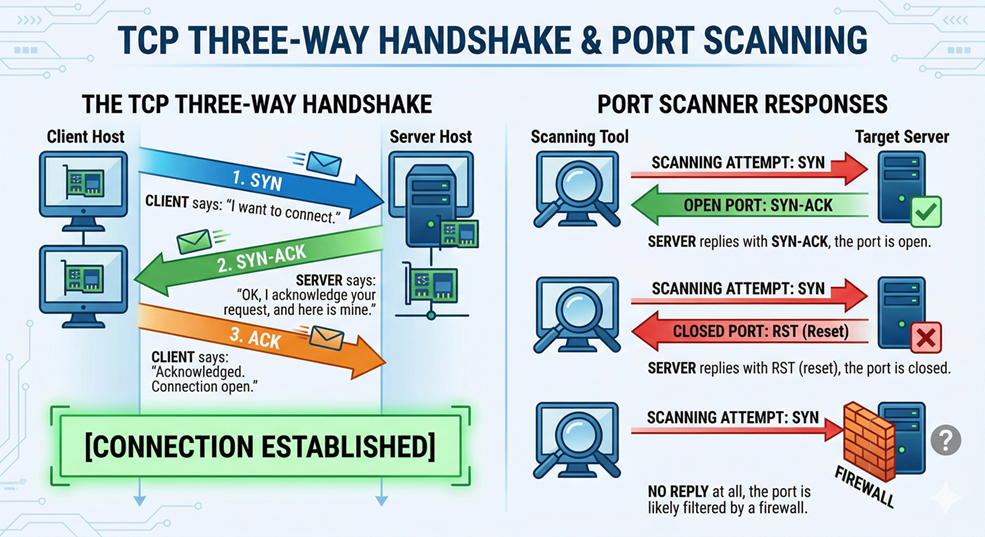
A port scanner exploits this: if the server replies with a SYN-ACK, the port is open. If it replies with RST (reset), the port is closed. If there is no reply at all, the port is likely filtered by a firewall.
TCP vs. UDP
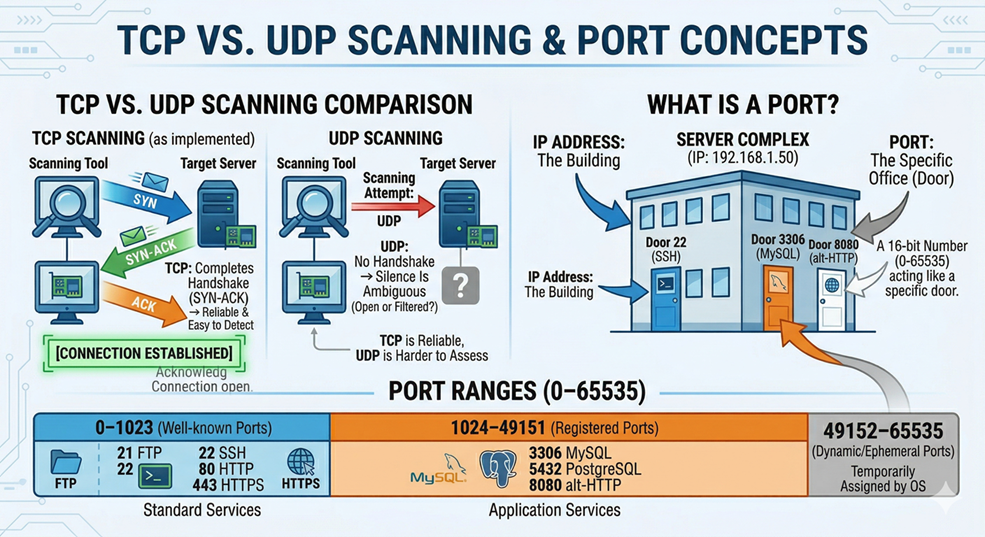
TCP scanning is reliable and easy to detect because it completes the handshake. UDP scanning is harder — UDP has no handshake, so silence does not necessarily mean “closed.” We focus on TCP for this lab.
What is a Port?
A port is a 16-bit number (0–65535) that acts like a door number on a building. The IP address is the building; the port is the specific office. Key ranges to know:
| Range | Name | Examples |
|---|---|---|
| 0–1023 | Well-known ports | 21 FTP, 22 SSH, 80 HTTP, 443 HTTPS |
| 1024–49151 | Registered ports | 3306 MySQL, 5432 PostgreSQL, 8080 alt-HTTP |
| 49152–65535 | Dynamic/ephemeral | Temporarily assigned by the OS |
What is Banner Grabbing?
When you connect to an open port, many services send a greeting message called a banner. For example:
220 ProFTPD 1.3.5b Server (Debian)That single line reveals the service (FTP), the software (ProFTPD), the version (1.3.5b), and the OS (Debian). You didn’t do anything special — you just connected and read what came back.
The socket Library
Python’s built-in socket module is a thin wrapper around the operating system’s network stack. The key concepts:
socket.socket(AF_INET, SOCK_STREAM)— creates a TCP socket (AF_INET= IPv4,SOCK_STREAM= TCP).sock.connect((host, port))— attempts the three-way handshake.sock.settimeout(n)— how long (in seconds) to wait before giving up.sock.recv(n)— reads up tonbytes from the connection (used for banner grabbing).
The ipaddress Library
Python 3.3+ ships with the ipaddress module, which lets you work with IP addresses and networks cleanly:
import ipaddress

# Iterate over all hosts in a /24 subnet
for host in ipaddress.ip_network("192.168.1.0/24", strict=False).hosts():
    print(str(host))  # 192.168.1.1, 192.168.1.2, ...
This is far cleaner than manually splitting strings.
Exercise 1 — Check One Port
Goal: Write a function that returns True if a port is open, False if not.
# scanner_v1.py
import socket

def is_open(host, port, timeout=1.0):
    with socket.socket(socket.AF_INET, socket.SOCK_STREAM) as s:
        s.settimeout(timeout)
        # connect_ex returns 0 on success, an error code otherwise
        return s.connect_ex((host, port)) == 0

host = input("Host: ").strip()
port = int(input("Port: ").strip())

if is_open(host, port):
    print(f"[+] Port {port} is OPEN")
else:
    print(f"[-] Port {port} is CLOSED")
python3 scanner_v1.pyTry 127.0.0.1 on port 22 (open if SSH is running) and port 9999 (almost certainly closed).
Exercise 2 — Scan a Range of Ports
Goal: Loop through a list of ports and print the ones that are open.
# scanner_v2.py
import socket

def is_open(host, port, timeout=0.5):
    with socket.socket(socket.AF_INET, socket.SOCK_STREAM) as s:
        s.settimeout(timeout)
        return s.connect_ex((host, port)) == 0

host  = input("Host: ").strip()
start = int(input("Start port: ").strip())
end   = int(input("End port:   ").strip())

print(f"\nScanning {host} ports {start}–{end}...\n")

for port in range(start, end + 1):
    if is_open(host, port):
        print(f"[+] Port {port} OPEN")
python3 scanner_v2.pyTry scanning 127.0.0.1 from port 1 to 1024.
Exercise 3 — Grab the Banner
Goal: After connecting, read the first message the service sends back.
# scanner_v3.py
import socket

def scan(host, port, timeout=2.0):
    with socket.socket(socket.AF_INET, socket.SOCK_STREAM) as s:
        s.settimeout(timeout)
        if s.connect_ex((host, port)) != 0:
            return None  # Port is closed

        # Try to read the banner the service sends automatically
        try:
            banner = s.recv(1024)

            # HTTP servers won't reply until you send a request first
            if not banner:
                s.send(b"HEAD / HTTP/1.0\r\n\r\n")
                banner = s.recv(1024)

            return banner.decode("utf-8", errors="replace").strip()
        except socket.timeout:
            return "(no banner)"  # Connected but nothing was sent

host  = input("Host: ").strip()
ports = [21, 22, 25, 80, 443, 3306, 8080]  # Common ports to test

print(f"\n{'PORT':<8} {'BANNER'}")
print("-" * 60)

for port in ports:
    result = scan(host, port)
    if result is not None:
        print(f"{port:<8} {result[:50]}")
python3 scanner_v3.pyTry it on Metasploitable or DVWA virtual machine — you’ll see much richer banners.
Challenge Tasks
Challenge A. Modify scanner_v2.py to also print the total count of open ports found at the end of the scan and to save results to file.
Challenge B. Add a dictionary that maps port numbers to service names — { 21: "FTP", 22: "SSH", 23: "Telnet", 25: "SMTP", 53: "DNS", 80: "HTTP", 110: "POP3", 143: "IMAP", 443: "HTTPS", 3306: "MySQL", 3389: "RDP", 8080: "HTTP-alt" } — and display the service name next to each open port.
Challenge C. Research the difference between a TCP Full Connect scan (what you built) and a TCP SYN scan. Why is a SYN scan harder for firewalls to detect? What Python library would let you build one? Write a short paragraph — no code needed.
By Wahid Hamdi