Lab 04 — SQS & SNS: Messaging and Event-Driven Architecture
Series: Le Café ☕ — AWS Hands-On Labs with LocalStack
Level: Intermediate | Duration: ~90 min
Prerequisites: Labs 00–03 complete, LocalStack running,awslocalconfigured
🎯 Learning Objectives
By the end of this lab you will be able to:
- Explain what a message queue is and why distributed systems need one
- Distinguish between SQS standard queues and FIFO queues and know when to use each
- Send, receive, and delete messages from an SQS queue using the CLI
- Explain what a pub/sub topic is and how SNS implements the pattern
- Create an SNS topic, subscribe multiple endpoints to it, and publish a message
- Wire SQS and SNS together so a single event fans out to multiple consumers
- Recognise the architectural problems that messaging solves and the new ones it introduces
🏪 Scenario — Le Café’s Growing Order Pipeline
Le Café now has multiple systems that care about a new customer order. The kitchen display needs to show the order immediately. The inventory system needs to decrement stock. The manager wants a notification on their phone whenever a large order comes in. The loyalty programme needs to award points to the customer’s account.
The naive approach would be for the ordering application to call each of these systems directly, one after another. You will quickly see why that fails, and how SQS and SNS together solve the problem elegantly — which is the architecture Le Café will adopt by the end of this lab.
🧠 Concept — Why Distributed Systems Need Messaging
Before touching the terminal, take a moment to really feel the problem that messaging solves. This is worth thinking through carefully, because once you see it, you will recognise the pattern everywhere.
Imagine the Le Café ordering application calls the kitchen system directly over HTTP. This works beautifully in a demo. But what happens when the kitchen system is temporarily unavailable for a restart? The ordering application crashes or returns an error to the customer — a purchase fails because of an internal system hiccup. Now add the inventory system to the same direct call chain: if inventory is slow, every order takes longer. Add the loyalty programme: now you have three dependencies, any one of which can break or slow the entire checkout experience. This pattern — where one service directly and synchronously calls others — is called tight coupling, and it is the architectural equivalent of building a house of cards.
Loose coupling through messaging solves this by placing a durable intermediary between the producer (the ordering app) and the consumers (kitchen, inventory, loyalty). The ordering app drops a message into a queue and immediately returns success to the customer. It does not know or care whether the kitchen system is up, whether inventory is slow, or whether the loyalty service even exists yet. Each downstream system reads from the queue independently, at its own pace. If the kitchen display crashes and restarts, the messages are still waiting in the queue when it comes back up — nothing was lost.
AWS provides two complementary messaging services, and understanding the difference between them is the foundation of this lab.
SQS (Simple Queue Service) implements the point-to-point messaging pattern. There is one queue and one consumer (or a pool of competing consumers). When a consumer reads a message and processes it successfully, it deletes the message from the queue and it is gone. If you have five kitchen terminals reading from the same queue, each order goes to exactly one terminal — the first one to claim it. This is the right model when you have a workload to distribute across a pool of workers, where each unit of work should be done exactly once.
SNS (Simple Notification Service) implements the publish-subscribe (pub/sub) pattern. There is one topic and potentially many subscribers. When a producer publishes a message to the topic, SNS delivers a copy of that message to every subscriber simultaneously. This is the right model when a single event needs to trigger multiple independent reactions — the manager’s phone notification, the inventory update, and the loyalty point award all need to happen, not just one of them.
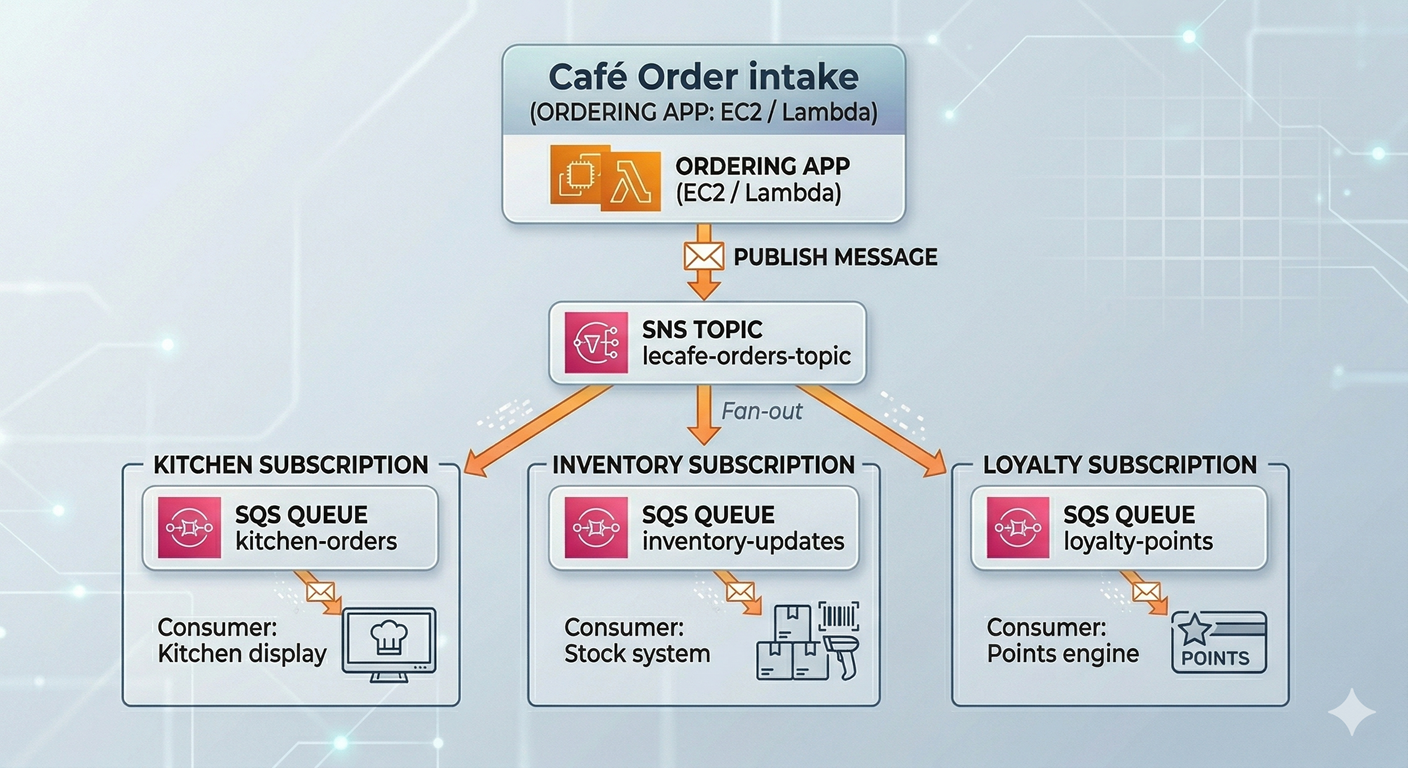
The real power emerges when you combine the two. The ordering app publishes one message to an SNS topic. SNS fans that message out to multiple SQS queues — one per downstream system. Each system has its own queue, drains it at its own pace, and can fail and recover independently without affecting any other system. This pattern is called fan-out and it is one of the most important architectural patterns in cloud-native design.
💡 A concrete analogy to make this stick. Think of SQS as a to-do list shared by a team: tasks go in, team members pick them up one at a time, and each task gets done by exactly one person. Think of SNS as a company-wide email announcement: one message goes out, and every employee on the mailing list receives their own copy. The fan-out pattern is like sending a company announcement that automatically drops a personalised task onto each team’s to-do list.
🏗️ Architecture — Le Café’s Fan-Out Order Pipeline
The following diagram shows the architecture we will build in this lab:
⚙️ Part 1 — Deep Dive into SQS
Step 1 — Start LocalStack and Set Your Environment
localstack start -d
localstack status services
export AWS_PROFILE=localstack
Step 2 — Understand Queue Types Before Creating One
SQS offers two queue types, and choosing the wrong one is a common mistake that is painful to fix later — you cannot convert between types after creation.
A Standard Queue offers maximum throughput. Messages are delivered at least once, and delivery order is best-effort but not guaranteed. “At least once” is an important phrase: under rare conditions, SQS might deliver the same message twice. Your consumer code must be written to handle duplicates gracefully — a property called idempotency. Standard queues can handle virtually unlimited messages per second, making them ideal for high-volume workloads where occasional duplicates and slight reordering are acceptable.
A FIFO Queue (First-In, First-Out) guarantees that messages are delivered in exactly the order they were sent, and that each message is processed exactly once. The trade-off is throughput: FIFO queues support up to 3,000 messages per second with batching. FIFO queues also require a .fifo suffix in their name and a MessageGroupId on every message you send. They are the right choice when order matters — for example, a sequence of financial transactions on an account where applying them out of order would corrupt the balance.
For Le Café’s kitchen orders, we will use a standard queue (order doesn’t need to be strict since the kitchen handles orders by table number), and a FIFO queue for the payment processing system where transaction order is critical.
Step 3 — Create the Kitchen Orders Queue (Standard)
# Create the main kitchen orders queue
awslocal sqs create-queue \
  --queue-name lecafe-kitchen-orders \
  --attributes '{
    "VisibilityTimeout": "30",
    "MessageRetentionPeriod": "86400",
    "ReceiveMessageWaitTimeSeconds": "20"
  }'
Each of these attributes deserves an explanation because they define the operational behaviour of the queue in ways that matter enormously in production.
VisibilityTimeout (30 seconds here) is the most important attribute to understand. When a consumer reads a message from SQS, the message is not immediately deleted — it is hidden from other consumers for the duration of the visibility timeout. This gives the consumer time to process the message and then explicitly delete it. If the consumer crashes before deleting it, the timeout expires and the message becomes visible again so another consumer can retry it. Think of it as a temporary reservation: the message is claimed but not consumed until explicitly confirmed. You should set this to slightly longer than your processing time so that crashes trigger retries but slow processors do not accidentally trigger double-processing.
MessageRetentionPeriod (86,400 seconds = 24 hours) defines how long SQS keeps unprocessed messages before discarding them. The maximum is 14 days. For kitchen orders, 24 hours is reasonable — an order older than a day is no longer relevant. For compliance or audit workloads, you might keep messages for the full 14 days.
ReceiveMessageWaitTimeSeconds (20 seconds) enables long polling. Without this, a consumer calling ReceiveMessage when the queue is empty gets an immediate empty response and must call again immediately — this wastes API calls and costs money. With long polling enabled, the API call waits up to 20 seconds for a message to arrive before returning. This dramatically reduces API costs for queues that are not always busy and is almost always the right setting to enable.
# Retrieve and store the queue URL — you will use this in every subsequent operation
KITCHEN_QUEUE_URL=$(awslocal sqs get-queue-url \
  --queue-name lecafe-kitchen-orders \
  --query 'QueueUrl' \
  --output text)

echo "Kitchen queue URL: $KITCHEN_QUEUE_URL"
Step 4 — Create a Dead Letter Queue (DLQ)
A Dead Letter Queue is a separate SQS queue that receives messages which have failed processing a configurable number of times. It is one of the most important operational patterns in SQS and one that beginners consistently skip — until their first production incident where messages are silently disappearing.
The scenario it solves is this: imagine a malformed order message arrives in the kitchen queue. The kitchen application tries to parse it, crashes, and the message becomes visible again after the visibility timeout. Another consumer picks it up, crashes again. This cycle repeats indefinitely — a poison pill that blocks queue processing and causes consumer crashes. A DLQ solves this by counting how many times a message has been received. After a configured threshold (say, 3 attempts), SQS moves the message to the DLQ automatically. The broken message is isolated for inspection, and the main queue continues processing cleanly.
# Create the dead letter queue first
awslocal sqs create-queue \
  --queue-name lecafe-kitchen-orders-dlq

DLQ_URL=$(awslocal sqs get-queue-url \
  --queue-name lecafe-kitchen-orders-dlq \
  --query 'QueueUrl' \
  --output text)

# Retrieve the DLQ's ARN — needed to configure the redrive policy
DLQ_ARN=$(awslocal sqs get-queue-attributes \
  --queue-url $DLQ_URL \
  --attribute-names QueueArn \
  --query 'Attributes.QueueArn' \
  --output text)

echo "DLQ ARN: $DLQ_ARN"
# Attach the DLQ to the kitchen queue via a redrive policy
# maxReceiveCount: 3 means "move to DLQ after 3 failed attempts"
awslocal sqs set-queue-attributes \
--queue-url $KITCHEN_QUEUE_URL \
--attributes "{
\"RedrivePolicy\": \"{\\\"deadLetterTargetArn\\\":\\\"$DLQ_ARN\\\",\\\"maxReceiveCount\\\":\\\"3\\\"}\"
}"
echo "DLQ configured on kitchen queue."The double-escaping in that JSON is unfortunate but necessary: the RedrivePolicy attribute value must itself be a JSON string (not a nested object), so the inner JSON must be escaped. This is one of those CLI quirks that is worth knowing so you recognise it when you encounter it.
Step 5 — Send Messages to the Queue
Now let’s simulate the ordering application placing customer orders onto the queue.
# Send a first order — a simple flat white and a croissant
awslocal sqs send-message \
  --queue-url $KITCHEN_QUEUE_URL \
  --message-body '{
    "orderId": "ORD-001",
    "table": 4,
    "items": [
      {"product": "Flat White", "quantity": 1, "price": 3.50},
      {"product": "Croissant",  "quantity": 2, "price": 2.00}
    ],
    "totalAmount": 7.50,
    "timestamp": "2026-03-30T09:15:00Z"
  }' \
  --message-attributes '{
    "OrderType": {
      "DataType": "String",
      "StringValue": "dine-in"
    },
    "Priority": {
      "DataType": "String",
      "StringValue": "normal"
    }
  }'
Notice that we included --message-attributes alongside the message body. Message attributes are metadata that travel with the message but are separate from the body. Consumers can filter or route based on attributes without parsing the full message body — this becomes important when SNS subscription filters are involved, which we will cover shortly.
# Send two more orders to give the queue some depth
awslocal sqs send-message \
  --queue-url $KITCHEN_QUEUE_URL \
  --message-body '{"orderId":"ORD-002","table":7,"items":[{"product":"Espresso","quantity":2,"price":2.50}],"totalAmount":5.00,"timestamp":"2026-03-30T09:16:00Z"}' \
  --message-attributes '{"OrderType":{"DataType":"String","StringValue":"dine-in"},"Priority":{"DataType":"String","StringValue":"normal"}}'

awslocal sqs send-message \
  --queue-url $KITCHEN_QUEUE_URL \
  --message-body '{"orderId":"ORD-003","table":1,"items":[{"product":"Cold Brew","quantity":4,"price":4.00},{"product":"Pain au Chocolat","quantity":4,"price":2.50}],"totalAmount":26.00,"timestamp":"2026-03-30T09:17:00Z"}' \
  --message-attributes '{"OrderType":{"DataType":"String","StringValue":"dine-in"},"Priority":{"DataType":"String","StringValue":"high"}}'

# Check queue depth — how many messages are waiting?
awslocal sqs get-queue-attributes \
  --queue-url $KITCHEN_QUEUE_URL \
  --attribute-names ApproximateNumberOfMessages \
  --query 'Attributes.ApproximateNumberOfMessages' \
  --output text
Step 6 — Receive and Process Messages (The Consumer Loop)
In production, a consumer is a long-running process — a background service, a Lambda function, or a containerised worker — that continuously polls the queue and processes messages. Here we will simulate that process manually to see exactly what the consumer experiences.
# Receive a message — this "claims" it for 30 seconds (our visibility timeout)
MESSAGE=$(awslocal sqs receive-message \
  --queue-url $KITCHEN_QUEUE_URL \
  --max-number-of-messages 1 \
  --message-attribute-names All \
  --wait-time-seconds 5)

echo $MESSAGE | python3 -m json.tool
Study the response carefully. You will see the Body (the JSON you sent), the MessageAttributes, a MessageId (a UUID assigned by SQS), and most importantly, a ReceiptHandle. The receipt handle is a long opaque token that is your proof-of-claim on this message. You must present it to delete the message after processing. The receipt handle is not the same as the message ID — it changes every time the message is received, because it encodes the specific “lease” rather than the message’s permanent identity.
# Extract the receipt handle from the response for use in the next command
RECEIPT_HANDLE=$(echo $MESSAGE | python3 -c "
import json, sys
data = json.load(sys.stdin)
print(data['Messages'][0]['ReceiptHandle'])
")

echo "Receipt handle: $RECEIPT_HANDLE"
# Simulate successful processing — delete the message to confirm it is done
awslocal sqs delete-message \
--queue-url $KITCHEN_QUEUE_URL \
--receipt-handle "$RECEIPT_HANDLE"
echo "Message processed and deleted."
# Confirm the queue now has one fewer message
awslocal sqs get-queue-attributes \
--queue-url $KITCHEN_QUEUE_URL \
--attribute-names ApproximateNumberOfMessages \
--query 'Attributes.ApproximateNumberOfMessages' \
--output textStep 7 — Create the FIFO Queue for Payment Processing
Let’s now create the FIFO queue that handles financial transactions, where ordering guarantees are essential.
# FIFO queues require the .fifo suffix in the name
awslocal sqs create-queue \
  --queue-name lecafe-payments.fifo \
  --attributes '{
    "FifoQueue": "true",
    "ContentBasedDeduplication": "true",
    "VisibilityTimeout": "60"
  }'

PAYMENTS_QUEUE_URL=$(awslocal sqs get-queue-url \
  --queue-name lecafe-payments.fifo \
  --query 'QueueUrl' \
  --output text)

echo "Payments FIFO queue URL: $PAYMENTS_QUEUE_URL"
ContentBasedDeduplication: true is a FIFO-specific feature that automatically generates a deduplication ID by hashing the message body. If you accidentally send the same payment message twice within 5 minutes, SQS will silently discard the duplicate. This is how FIFO queues deliver the “exactly once” guarantee.
# Send a payment to the FIFO queue
# Note the required MessageGroupId — all messages with the same group ID
# are processed in strict order relative to each other
awslocal sqs send-message \
  --queue-url $PAYMENTS_QUEUE_URL \
  --message-body '{
    "paymentId": "PAY-001",
    "orderId":   "ORD-003",
    "amount":    26.00,
    "currency":  "EUR",
    "method":    "card",
    "status":    "authorised"
  }' \
  --message-group-id "table-1"

echo "Payment message sent to FIFO queue."
📣 Part 2 — Explore SNS and the Pub/Sub Pattern
Step 8 — Create the Central SNS Topic
The SNS topic is the broadcast channel. The ordering application will publish every new order to this topic, and SNS will deliver a copy to every subscriber — regardless of how many subscribers there are or what technology they use.
# Create the SNS topic
TOPIC_ARN=$(awslocal sns create-topic \
  --name lecafe-orders-topic \
  --query 'TopicArn' \
  --output text)

echo "Topic ARN: $TOPIC_ARN"
The ARN for your topic in LocalStack will look like arn:aws:sns:us-east-1:000000000000:lecafe-orders-topic. Keep this handy — you need it whenever you subscribe, publish, or manage the topic.
Step 9 — Create the Downstream SQS Queues
Each downstream system gets its own dedicated queue. This isolation is important: the kitchen system processing slowly does not slow down the inventory system, and a crash in the loyalty engine does not affect the kitchen display.
# Create queues for each downstream consumer
awslocal sqs create-queue --queue-name lecafe-inventory-updates
awslocal sqs create-queue --queue-name lecafe-loyalty-points
awslocal sqs create-queue --queue-name lecafe-manager-alerts

# Retrieve all queue URLs
INVENTORY_QUEUE_URL=$(awslocal sqs get-queue-url --queue-name lecafe-inventory-updates --query 'QueueUrl' --output text)
LOYALTY_QUEUE_URL=$(awslocal sqs get-queue-url    --queue-name lecafe-loyalty-points    --query 'QueueUrl' --output text)
MANAGER_QUEUE_URL=$(awslocal sqs get-queue-url    --queue-name lecafe-manager-alerts    --query 'QueueUrl' --output text)

# Retrieve all queue ARNs — needed for SNS subscriptions and queue policies
INVENTORY_ARN=$(awslocal sqs get-queue-attributes --queue-url $INVENTORY_QUEUE_URL --attribute-names QueueArn --query 'Attributes.QueueArn' --output text)
LOYALTY_ARN=$(awslocal sqs get-queue-attributes   --queue-url $LOYALTY_QUEUE_URL   --attribute-names QueueArn --query 'Attributes.QueueArn' --output text)
MANAGER_ARN=$(awslocal sqs get-queue-attributes   --queue-url $MANAGER_QUEUE_URL   --attribute-names QueueArn --query 'Attributes.QueueArn' --output text)

echo "All downstream queues created."
echo "Inventory ARN : $INVENTORY_ARN"
echo "Loyalty ARN   : $LOYALTY_ARN"
echo "Manager ARN   : $MANAGER_ARN"
Step 10 — Grant SNS Permission to Write to the SQS Queues
This is a step that beginners consistently forget, and it causes mysterious “permission denied” errors when testing. By default, an SQS queue will not accept messages from anyone except the queue owner. Before SNS can deliver messages to these queues, each queue needs a resource-based policy that explicitly allows the SNS topic to call sqs:SendMessage on it.
# Helper function to apply the allow policy to a given queue
apply_sns_policy() {
  local QUEUE_URL=$1
  local QUEUE_ARN=$2

  awslocal sqs set-queue-attributes \
    --queue-url "$QUEUE_URL" \
    --attributes "{
      \"Policy\": \"{
        \\\"Version\\\": \\\"2012-10-17\\\",
        \\\"Statement\\\": [{
          \\\"Sid\\\": \\\"AllowSNSPublish\\\",
          \\\"Effect\\\": \\\"Allow\\\",
          \\\"Principal\\\": {\\\"Service\\\": \\\"sns.amazonaws.com\\\"},
          \\\"Action\\\": \\\"sqs:SendMessage\\\",
          \\\"Resource\\\": \\\"$QUEUE_ARN\\\",
          \\\"Condition\\\": {
            \\\"ArnEquals\\\": {
              \\\"aws:SourceArn\\\": \\\"$TOPIC_ARN\\\"
            }
          }
        }]
      }\"
    }"
}

apply_sns_policy "$INVENTORY_QUEUE_URL" "$INVENTORY_ARN"
apply_sns_policy "$LOYALTY_QUEUE_URL"   "$LOYALTY_ARN"
apply_sns_policy "$MANAGER_QUEUE_URL"   "$MANAGER_ARN"

echo "SNS permissions granted on all queues."
The Condition block with ArnEquals on aws:SourceArn is the key security detail here. It ensures only your specific SNS topic can send to these queues — not just any SNS topic, and not any other service. Without this condition, any SNS topic in any AWS account could theoretically send messages to your queues if the policy only checks the service principal sns.amazonaws.com.
Step 11 — Subscribe the SQS Queues to the SNS Topic
Now we wire the queues to the topic. Each subscription tells SNS “when a message is published to this topic, deliver a copy to this endpoint.”
# Subscribe each queue to the topic
awslocal sns subscribe \
  --topic-arn $TOPIC_ARN \
  --protocol sqs \
  --notification-endpoint $INVENTORY_ARN

awslocal sns subscribe \
  --topic-arn $TOPIC_ARN \
  --protocol sqs \
  --notification-endpoint $LOYALTY_ARN

awslocal sns subscribe \
  --topic-arn $TOPIC_ARN \
  --protocol sqs \
  --notification-endpoint $MANAGER_ARN

# Verify all three subscriptions are confirmed
awslocal sns list-subscriptions-by-topic --topic-arn $TOPIC_ARN
In real AWS, subscribing an HTTP/HTTPS endpoint or an email address to SNS requires the endpoint to confirm the subscription by responding to a confirmation request. SQS subscriptions are confirmed automatically because AWS can verify ownership of the queue. In LocalStack, all subscriptions are confirmed immediately.
Step 12 — Add a Subscription Filter for Manager Alerts
Right now, the manager’s queue will receive every order regardless of size or priority. That would be overwhelming — the manager only cares about high-value orders. SNS subscription filters let you add a policy to a specific subscription that causes SNS to only deliver messages whose attributes match defined criteria.
# First, get the subscription ARN for the manager queue
MANAGER_SUB_ARN=$(awslocal sns list-subscriptions-by-topic \
  --topic-arn $TOPIC_ARN \
  --query "Subscriptions[?Endpoint=='$MANAGER_ARN'].SubscriptionArn" \
  --output text)

echo "Manager subscription ARN: $MANAGER_SUB_ARN"

# Apply a filter policy: only deliver messages where Priority = "high"
awslocal sns set-subscription-attributes \
  --subscription-arn $MANAGER_SUB_ARN \
  --attribute-name FilterPolicy \
  --attribute-value '{"Priority": ["high"]}'

echo "Filter applied — manager queue will only receive high-priority orders."
This filter policy is extraordinarily powerful. It means the ordering application does not need to know anything about the manager’s alerting rules — it simply publishes every order with its attributes, and SNS handles the routing. If the business rule changes (for example, “also alert on table orders over €50”), you update the SNS filter policy without touching the ordering application at all. This is what loose coupling really means in practice.
🔗 Part 3 — Test the Fan-Out Pipeline
Step 13 — Publish an Order to the SNS Topic
Now we test the entire pipeline with a single publish call.
# Publish a high-value order — this should reach ALL THREE queues
awslocal sns publish \
  --topic-arn $TOPIC_ARN \
  --message '{
    "orderId":     "ORD-100",
    "table":       12,
    "items": [
      {"product": "Cold Brew",        "quantity": 6, "price": 4.00},
      {"product": "Pain au Chocolat", "quantity": 6, "price": 2.50}
    ],
    "totalAmount": 39.00,
    "timestamp":   "2026-03-30T10:00:00Z"
  }' \
  --message-attributes '{
    "Priority": {"DataType": "String", "StringValue": "high"},
    "OrderType": {"DataType": "String", "StringValue": "dine-in"}
  }' \
  --subject "New Le Cafe Order"

echo "Order published to SNS topic."
# Publish a normal-priority order — this should reach inventory and loyalty, but NOT the manager
awslocal sns publish \
--topic-arn $TOPIC_ARN \
--message '{
"orderId": "ORD-101",
"table": 3,
"items": [
{"product": "Espresso", "quantity": 1, "price": 2.50}
],
"totalAmount": 2.50,
"timestamp": "2026-03-30T10:01:00Z"
}' \
--message-attributes '{
"Priority": {"DataType": "String", "StringValue": "normal"},
"OrderType": {"DataType": "String", "StringValue": "dine-in"}
}' \
--subject "New Le Cafe Order"
echo "Normal order published."Step 14 — Verify the Fan-Out Results
This is the moment of truth. Check each queue independently to confirm that SNS delivered messages correctly.
# Check how many messages arrived in each queue
echo "=== Inventory queue (should have 2 messages) ==="
awslocal sqs get-queue-attributes \
  --queue-url $INVENTORY_QUEUE_URL \
  --attribute-names ApproximateNumberOfMessages \
  --query 'Attributes.ApproximateNumberOfMessages' \
  --output text

echo "=== Loyalty queue (should have 2 messages) ==="
awslocal sqs get-queue-attributes \
  --queue-url $LOYALTY_QUEUE_URL \
  --attribute-names ApproximateNumberOfMessages \
  --query 'Attributes.ApproximateNumberOfMessages' \
  --output text

echo "=== Manager queue (should have 1 message — high priority only) ==="
awslocal sqs get-queue-attributes \
  --queue-url $MANAGER_QUEUE_URL \
  --attribute-names ApproximateNumberOfMessages \
  --query 'Attributes.ApproximateNumberOfMessages' \
  --output text
If the counts match the expectations in the comments, your fan-out pipeline is working correctly. Both orders reached inventory and loyalty (no filter). Only the high-priority order reached the manager queue (filter applied).
# Read the message from the manager queue to inspect its structure
awslocal sqs receive-message \
  --queue-url $MANAGER_QUEUE_URL \
  --max-number-of-messages 1 | python3 -m json.tool
Look at the Body field of the received message carefully. It is not the raw JSON you published. SNS wraps the message in an envelope containing metadata: the Type (Notification), the TopicArn, the Subject, the original Message (as a string), and a Timestamp. Your consumer code needs to parse this envelope and then parse the inner Message string as JSON. This is a common gotcha that causes confusion when first reading SNS-delivered messages from SQS.
🛡️ Defender’s Perspective
The move from synchronous to asynchronous messaging introduces a new category of security considerations that are worth thinking through carefully.
Message bodies may contain sensitive data. An order message contains a table number and items, which is harmless. But in other systems, queue messages carry personally identifiable information, payment details, or access tokens. SQS supports server-side encryption using AWS KMS, which encrypts messages at rest and in transit between SQS and your consumer. In a real account, any queue carrying sensitive data should have encryption enabled using KmsMasterKeyId in the queue attributes.
The SNS-to-SQS permission pattern prevents hijacking. The ArnEquals condition in the queue policy you wrote in Step 10 ensures that only your specific SNS topic can write to these queues. Without it, any SNS topic — including one controlled by an attacker who has gained partial access to your account — could flood your queues with malicious messages. The consumer application, trusting anything in the queue, would process those messages as legitimate orders. This is a message injection attack, and the condition key is your defence.
DLQs need their own monitoring. A message arriving in the DLQ is a signal that something is broken — either the consumer is crashing, or the message is malformed. In production, you should configure a CloudWatch alarm on the ApproximateNumberOfMessagesVisible metric of every DLQ. An alarm threshold of 1 (alert on any message in the DLQ) is appropriate for most workloads. Without this monitoring, poison pill messages can silently accumulate in the DLQ for days while you believe the system is healthy.
Visibility timeouts and consumer idempotency must be designed together. If your processing takes 25 seconds and your visibility timeout is 30 seconds, you have a fragile system: any slowdown in processing will cause the message to become visible again and be picked up by a second consumer, resulting in double-processing. Either increase the timeout generously above your worst-case processing time, or implement consumer-side idempotency (checking whether this order ID has already been processed before acting on it). In most production systems, both strategies are used together.
🧩 Challenge Tasks
Challenge 1 — Batch Operations. The send-message-batch API allows you to send up to 10 messages in a single API call, reducing both cost and latency. Write a send-message-batch command that sends three orders simultaneously to the kitchen queue. Each entry in the batch requires a unique Id (a client-side identifier used to match batch results). Research the --entries format and verify that all three messages are delivered.
Challenge 2 — Message Visibility Extension. Simulate a slow consumer: receive a message from the kitchen queue, then immediately call change-message-visibility to extend the visibility timeout by an additional 60 seconds. This is the pattern used by long-running processors to prevent their messages from being requeued while they are still working. Verify by checking the queue’s ApproximateNumberOfMessagesNotVisible attribute before and after.
Challenge 3 — SNS Email Subscription. Add a fourth subscriber to the lecafe-orders-topic using the email protocol and a real email address. Observe what happens: LocalStack will accept the subscription, but in real AWS a confirmation email would be sent to the address before delivery begins. Research how you would programmatically confirm the subscription in a test environment using the confirmation token.
🤔 Reflection Questions
-
A standard SQS queue guarantees “at least once” delivery, meaning a message might occasionally be delivered twice. Think of a realistic scenario where double-processing a Le Café order message would cause a concrete problem (for example, in the loyalty points system). How would you design the consumer to be idempotent — that is, to produce the same result whether it processes a message once or five times?
-
The SNS subscription filter we applied uses message attributes to route messages. An alternative approach would be to have the ordering application publish to different topics depending on order priority (a
lecafe-orders-hightopic and alecafe-orders-normaltopic). What are the trade-offs between the filter-based approach and the multi-topic approach? When would you prefer each one? -
In this lab, the ordering application publishes to SNS synchronously and waits for a success response before confirming the order to the customer. SNS is highly available, but it can occasionally be slow or unavailable. What additional architectural layer would you add between the ordering application and the SNS topic to ensure that no order is ever lost even if SNS is temporarily unavailable at the moment the customer clicks “place order”?
🧹 Cleanup
# Delete all SNS subscriptions (list them first, then delete each)
awslocal sns list-subscriptions-by-topic \
  --topic-arn $TOPIC_ARN \
  --query 'Subscriptions[].SubscriptionArn' \
  --output text | tr '\t' '\n' | while read SUB_ARN; do
    awslocal sns unsubscribe --subscription-arn "$SUB_ARN"
    echo "Unsubscribed: $SUB_ARN"
  done

# Delete the SNS topic
awslocal sns delete-topic --topic-arn $TOPIC_ARN

# Delete all SQS queues
for QUEUE_URL in \
  $KITCHEN_QUEUE_URL \
  $DLQ_URL \
  $PAYMENTS_QUEUE_URL \
  $INVENTORY_QUEUE_URL \
  $LOYALTY_QUEUE_URL \
  $MANAGER_QUEUE_URL; do
    awslocal sqs delete-queue --queue-url "$QUEUE_URL"
    echo "Deleted queue: $QUEUE_URL"
  done

localstack stop
echo "All messaging resources cleaned up."
📋 Quick Reference
| Task | Command |
|---|---|
| Create standard queue | awslocal sqs create-queue --queue-name NAME --attributes '{...}' |
| Create FIFO queue | awslocal sqs create-queue --queue-name NAME.fifo --attributes '{"FifoQueue":"true",...}' |
| Get queue URL | awslocal sqs get-queue-url --queue-name NAME |
| Get queue ARN | awslocal sqs get-queue-attributes --queue-url URL --attribute-names QueueArn |
| Check queue depth | awslocal sqs get-queue-attributes --queue-url URL --attribute-names ApproximateNumberOfMessages |
| Send message | awslocal sqs send-message --queue-url URL --message-body '...' |
| Receive message | awslocal sqs receive-message --queue-url URL --max-number-of-messages 1 |
| Delete message | awslocal sqs delete-message --queue-url URL --receipt-handle HANDLE |
| Extend visibility | awslocal sqs change-message-visibility --queue-url URL --receipt-handle H --visibility-timeout N |
| Create SNS topic | awslocal sns create-topic --name NAME |
| Subscribe SQS to SNS | awslocal sns subscribe --topic-arn ARN --protocol sqs --notification-endpoint QUEUE_ARN |
| Apply filter policy | awslocal sns set-subscription-attributes --subscription-arn ARN --attribute-name FilterPolicy --attribute-value '...' |
| Publish to topic | awslocal sns publish --topic-arn ARN --message '...' --message-attributes '{...}' |
| List subscriptions | awslocal sns list-subscriptions-by-topic --topic-arn ARN |